
RV Office Ideas: Desks, Workmates and Recliners With a Laptop Table
 By Michael King, Owner

A good RV office doesn't need a built-in desk. You can work from a two-seat Workmate with a table between the seats, a recliner with a computer side table, or the dinette with a real chair. Then add three basics: charging at the seat, light that doesn't hit your screen, and a connection you test before your first video meeting.
Key takeaways
- A Workmate gives two people a work spot: two reclining seats with a table between them. We list 15, from 62 to 78 inches wide, and all 15 list Wireless USB & USB-C as standard.
- Want a desk at your own seat? 66 of our product pages offer a computer side table, including 7 single recliners.
- The dinette still works as a desk. A swivel chair at the table can be easier on your back than a bench.
- The FCC lists 5 to 25 Mbps download for telecommuting. Test your speed at the campsite before you count on it.
Can you use your RV as a home office? Yes, if you plan for it. The hard part isn't the job. It's that the same few feet of floor are also your living room, dining room and guest room. So the trick is to pick furniture that works as a desk when you need one and gets out of the way when you don't.
These eight RV office ideas come from the pieces we sell at Open Road Interiors and from what RV owners ask our team when they plan a work spot. Each one says what it works best for and what it takes to fit.
1. Make a Workmate your two-person work spot

A Workmate is two reclining seats with a table between them. If two of you work on the road, it gives each person a seat and a shared surface for laptops, a notebook and coffee. When the workday ends, the table folds away and the piece is just comfortable seating again.
Our team describes how the table works: it pulls out of the center console, turns all the way around, and unfolds so both seats get a work surface. The 73″ Venture Zerowall Workmate page lists Mocha Cherry as the standard stain on the Workmate table, with other stain colors as an option.
This fall, a customer put together a Venture Zerowall Workmate with electric head tilt, the highback and the Workmate table in Mocha Cherry, together with a narrow-arm Ultra Sleeper. That pairs a work spot with a sofa that turns into a bed.
Works best for: couples who both work from the RV. What it takes: a wall of at least 62 inches.
2. Pick the Workmate width that fits your wall

Our 15 Workmates run 62, 67, 68, 69, 71, 72, 73, 76 and 78 inches wide. Two sizing tricks help in a tight slide-out:
- Narrow arms. The 69″ Encore Zerowall Workmate (Narrow Arm) is 4 inches narrower than the standard-arm version, with no cupholders in the arms.
- Narrower side walls. Our 69″ and 73″ Encore and Venture Zerowall Workmate pages list optional side walls that are 2 inches narrower, taking 4 inches off the overall width.
Then check what sits behind the seat. A Zerowall reclines without needing room behind it. Our team explains that a wallhugger needs about 3 inches of space past the valance or wall to recline, so under a low valance a Zerowall is usually the safer pick. Our guide to wall hugger vs zero wall recliners explains the difference.
The console also gives you office storage. The drawer under it is about 10½ inches wide, our team says, which is room for chargers, a mouse and a notepad.
Works best for: slide-outs with a window and valance behind the seats. What it takes: the wall width, the slide depth and what sits behind the seat.
3. Give a recliner its own computer side table

If you work alone, a single recliner with a computer side table is a desk that takes up one seat's worth of floor. The table swings over your lap for a laptop and back out of the way when you stand up.
Seven of our recliner pages list a computer side table. It is standard on the 31″ Encore Zerowall Recliner and the 35″ Encore standard-arm version, and an option on the others, from the 25″ Lazy Relax-R Lite to the 35″ Venture Zerowall Recliner. The table comes in Mocha Cherry stain unless you pick another color. Browse all RV recliners.
A recliner also lets you change position through the day. OSHA's computer workstation guide says sitting still in one posture for a long time isn't healthy, and suggests small changes to your chair or backrest, stretching, and standing up to walk around now and then. Sit up to type, lean back to read or take a call.
Works best for: one person who works from the living area. What it takes: room to recline in front of the seat, and a spot near an outlet if you choose electric.
4. Use theater seat arm tables for a laptop and lunch

Theater seats with arm tables give two people a small work surface each, without a table in the middle of the floor. In the motorhome above, wood tables swing out from both arms of a Venture theater seat.
On our Encore pieces, the side tables are standard. Brayden, our sales associate, describes them as teardrop-shaped tables set into the arms. They swivel around so each seat has a place to eat or use a computer, and they pop out for storage when you don't need them.
Across the catalog, the computer side table appears on 66 product pages: 24 theater seats, 8 reclining sofas, 8 jackknife sofas, 7 recliners, 6 Ultra Sleepers, 5 loveseats, 4 hide-a-beds and 4 Workmates.
Works best for: rigs where the seats face the TV and you want a laptop spot without a separate desk. What it takes: deciding whether you want the tables standard or as an add-on, model by model.
5. Turn the dinette into a desk

The dinette is the RV desk you already own. It has a table at the right height for eating, which is close to the right height for typing. The weak spot is usually the seat: a bench with a thin cushion and a straight back gets hard after a few hours.
You have two ways to fix that. New benches: our dinette sets come in Classic, Dutch and Felton styles, with 42″ or 48″ bench depths, and optional bed cushions. Or a chair: the Dutch Swivel Diner chair has a seat that swivels 360°, so you can turn to the window, the laptop or the room. We don't sell dining tables, so you keep your RV's table. Our RV dinette replacement ideas walk through the options.
Whatever you sit on, OSHA's guide describes a good working posture: feet flat on the floor or on a footrest, back supported, thighs about parallel to the floor, and elbows close to your body and bent between 90 and 120 degrees. If you can't change the table height, the guide suggests a footrest.
Works best for: people who work at a table and want the living area free in the evening. What it takes: bench depth, or room to swivel a chair without hitting the wall.
6. Put power and charging where you sit

An extension cord across the aisle is a tripping hazard in a small space. Charging built into the seat is neater. Wireless USB & USB-C charging is standard on all 15 of our Workmates and on 14 theater seats, and it appears as an option or standard feature on 80 product pages in all.
Power recline matters too. All of our Zerowall pieces list electric controls as standard, and our team explains that's because the mechanism that lets them recline close to the wall needs a motor. If you work off-grid, our team offers a battery pack, charged before a trip, so the seats recline without an outlet. It's one of the add-ons our customers choose most. When you order, ask where the charging plug will sit once the piece is bolted down, so you can reach it later.
Works best for: anyone who charges a phone, laptop and headphones every day. What it takes: an outlet near the seat, or a battery pack for dry camping.
7. Light the screen, not your eyes

RV living areas have big windows, and a window behind your laptop makes the screen hard to read. OSHA's workstation guide says bright light behind a display creates contrast problems and that bright light on the screen can lead to eye fatigue. Its fixes fit an RV well:
- Turn the seat or laptop so the window is at a right angle to the screen, not behind it or behind you.
- Use the day shades or blinds to let light in without it shining into your view.
- Add a small task light for paper work, shaded so it doesn't shine on the screen.
- Prefer soft, even light over one bright spot.
This is one more reason a swivel recliner or swivel chair is handy: you can turn away from the afternoon sun without moving furniture.
8. Test the connection before you count on it
The furniture is only half of a working RV office. The FCC's broadband speed guide lists rough minimum download speeds: 1 Mbps for email and browsing, 5 to 25 Mbps for telecommuting, and 6 Mbps for HD video conferencing. The FCC adds that these are guidelines, and more speed may help.
- Check coverage before you book. The FCC National Broadband Map shows 4G LTE and 5G coverage that carriers report. The FCC notes the map models outdoor and in-vehicle coverage, not indoor service, and real results vary with your device, tower load and terrain.
- Run a speed test at the site. Do it on day one, at the time of day you work.
- Boosters follow FCC rules. A consumer signal booster needs your wireless provider's consent and must be registered with the provider before you turn it on. Registration is free.
Put the seat where the signal and the light are best, then set up the furniture around it.
RV office setups compared
Sizes and options are from our product pages as listed in November 2026.
| Setup | Who it seats | Work surface | Charging | Widths we list |
|---|---|---|---|---|
| Workmate | Two | Table in the center console; arm side tables listed on 6 models | Wireless USB & USB-C standard on all 15 | 62″ to 78″ |
| Recliner with computer side table | One | Swing-over table | Plan an outlet nearby | 25″ to 35″ (the 7 with the table) |
| Theater seat with arm tables | Two or more | A table at each outer arm | Standard on 14 theater seats | 56″ to 78″ (all theater seats) |
| Dinette | Two to four | Your RV's table | Plan an outlet nearby | 42″ or 48″ bench depth |
Work-ready pieces from this guide
 73″ Encore Zerowall Workmate69″ Encore Zerowall Workmate (Narrow Arm)
 31″ Encore Zerowall Recliner
 Dutch Swivel Diner
Before you order furniture for your RV office
Our furniture is handmade by Amish artisans and built for RVs, but every rig is different. Measure the width of the wall, the depth of the slide, the height and depth of any valance behind the seat, and whether the slide is raised or flush with the floor. Our questions to ask before you buy RV furniture list the rest. If you live on the road, our guide to furniture for full-time RV living covers comfort, moisture and boondocking power.
We offer free delivery to the lower 48 states or free installation at our Lancaster shop on orders of $1,000 or more (see our shipping page). To sit in the pieces first, visit our showroom at 2460 Lincoln Highway, Suite 504, Lancaster, PA 17602, or call 717-400-5651.
Frequently asked questions
Can I use my RV as a home office?
Yes. You need a seat you can sit in for hours, a work surface, power at the seat and a reliable connection. The FCC lists 5 to 25 Mbps download for telecommuting and 6 Mbps for HD video conferencing, so test your speed at each campsite.
What is the best RV office chair?
It depends on where you work. At a dinette, a chair that swivels, like our Dutch Swivel Diner, is easier to get in and out of than a bench. In the living area, a recliner with a computer side table lets you sit up to type and lean back for calls. OSHA's guide suggests support for your back, feet on the floor or a footrest, and changing position through the day.
Which RV has the best office space?
We don't sell RVs, so we can't rank floor plans. Look for a living area with a long wall or slide-out where a Workmate or two recliners can face away from the biggest window, an outlet near the seats, and a dinette you can leave set up as a desk.
Can I add a desk to my RV without a remodel?
Often, yes. Swapping a sofa or theater seat for a Workmate, or a recliner for one with a computer side table, adds a work surface in the same footprint. Our team secures the new piece into your rig when we install it.
Do Workmates need electricity?
Our Zerowall Workmates list electric controls as standard. Our wallhugger Workmates offer electric controls or a manual inside handle. For dry camping, ask us about a battery pack.
Sources
- Federal Communications Commission, Broadband Speed Guide (checked November 2026)
- Federal Communications Commission, National Broadband Map: About (checked November 2026)
- Federal Communications Commission, Consumer Signal Boosters (checked November 2026)
- OSHA, Computer Workstations eTool: Good Working Positions and Workstation Environment (checked November 2026)
- Open Road Interiors: Before and After, Shipping and Installation
- Product pages on openroadinteriors.com (as listed in November 2026)
How we made this guide: we compared the Workmates, recliners, theater seats and dinette sets on our active product pages in November 2026 and counted which ones list a computer side table and USB charging. The stories and sizing tips come from our team's work with RV owners, shared without names. Posture and lighting tips cite OSHA, and the internet guidance cites the FCC.
Visit us
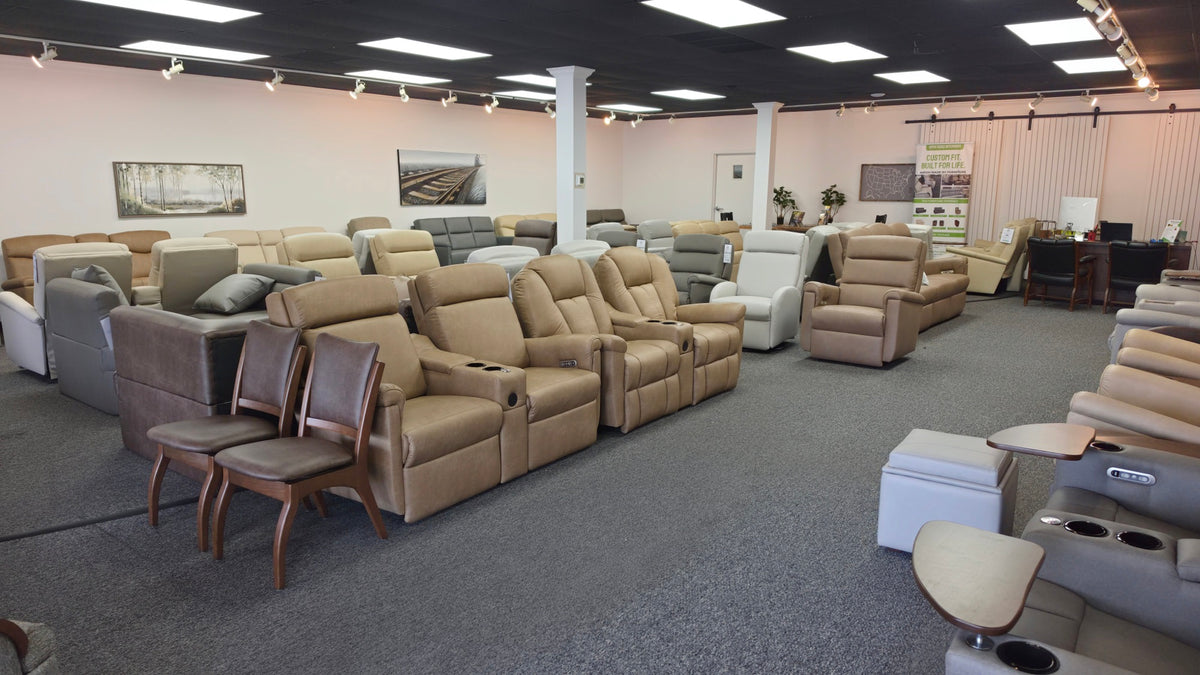
Come sit on it before you buy
Visit our Lancaster, PA showroom at 2460 Lincoln Highway, Suite 504. Open Monday to Saturday, 10 to 5, no appointment needed.


